The two e-paper modules are very energy-efficient. However, if a GPS module (e.g., UBLOX M100) is also connected, power consumption increases. If you want to process the GPS signals—for example, in TRACK mode—you should expect this to happen.
However, in the following situations, the GPS module can be completely disconnected from the power supply:
- If Track Mode is not needed
- If the module is started with the command –deepsleep is set to consume only a few microvolts.
Solution
MOSFET switches are a common component here:
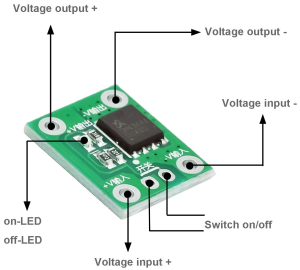
and here's a suggested circuit design with GPIO control:
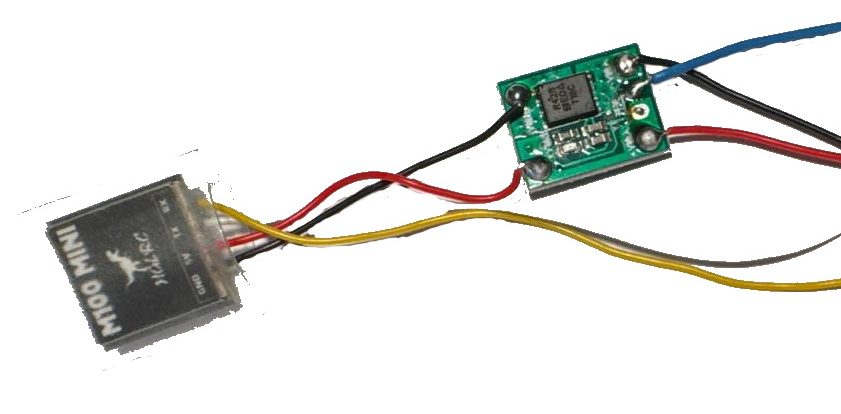
Wiring with the following connections:
- from each module to a MOSFET switch
- 3V7 (red) to Voltage Input+
- GND (black) to Voltage Input-
- GPIO (blue) GPS switch pin (pin 42 for E213 and E290) with Switch-on (right connector)
- UART TX (yellow) -> M100 RX (pin 44 for E213 and E290)
- UART RX (white) -> M100 TX (for E213 and E290, pin 43)
- from the MOSFET switch to the GPS module (e.g., M100)
- Voltage Output+ -> M100 5V (red)
- Voltage Output- -> M100 GND (black)
For the modules described, you can use the commands
- -gps on
- –track on
The GPS module must be turned on along with the MOSFET switch.
The User button can also be used to turn TRACK mode on or off:
- Action Triple-Click
This means that this function can be operated directly from the MeshCom module.