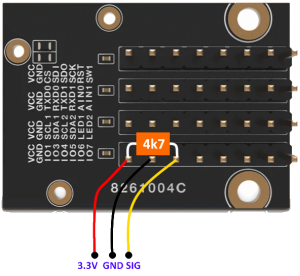
- Connect the sensor to the Onewire GPIO pin.
- The following OneWire sensors are supported and are connected to the same GPIO (Note: please only use a data PIN resistor once. A DHT11 module already has one termination):
-
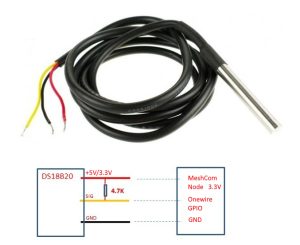
DS18B20 DS18B20
- DHT11
-
- The following OneWire sensors are supported and are connected to the same GPIO (Note: please only use a data PIN resistor once. A DHT11 module already has one termination):
- The pin can be set with the command
- --onewire gpio 99 to set. 99...GPIO Pin #
- All ESP32 and RAK modules are supported
- Onewire Data-PIN with 4k7 resistor against 3.3V high voltage.
- The sensor is connected to
- --onewire on activated.
- --onewire off deactivated.
- The data can be transferred via serial console or APP with
- --weather or
- --wx
- can be queried.
- All ESP32 and RAK modules are supported
- --wxdebug on provides additional information via serial console as an installation aid
-
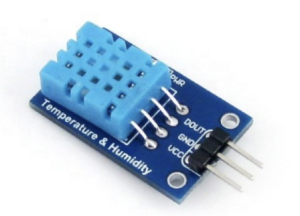
DHT11 Tested GPIO pins
- TBEAM GPIO 4
- T-LORA T3_V1.6.1 GPIO 4
- HELTEC_V2 GPIO 17
- HELTEC_V3.2GPIO 7 tested by DK1TCP
- HELTEC STICK V3 LITE GPIO 33 reviewed by DK1TCP
- E22 Board GPIO 25 tested by OE5HWN
- RAK with extra board 13002 IO01